What is a gateway?
Let’s keep it simple: a gateway is a device that translates information from one area to another. You can compare it to communication between countries that speak different languages. The gateway translates the “language” from area A into the specific format required in area B.
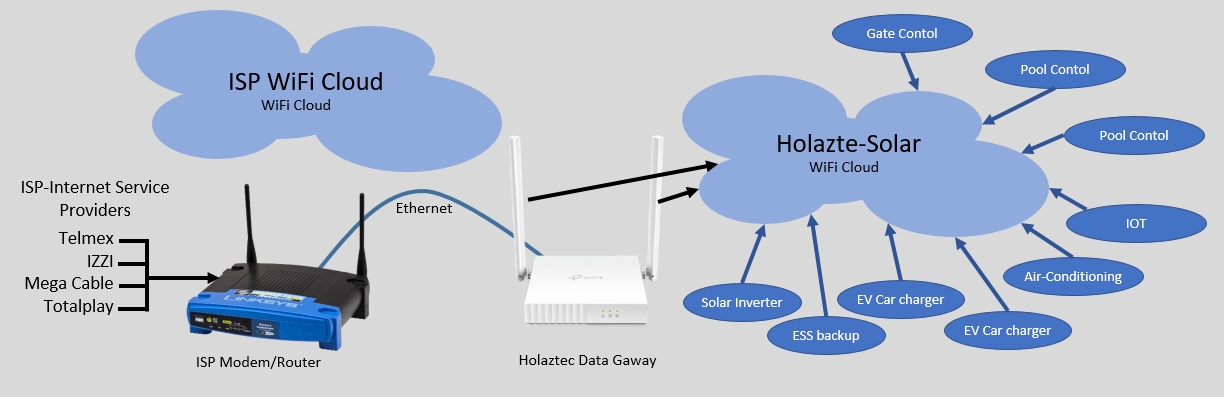
Modern homes can have many types of equipment that need to communicate over WiFi with remote computer systems. These devices can include mobile phones, solar inverters, ESS backup systems, electric vehicle chargers, doorbells, security cameras, air-conditioning systems, gate controllers, swimming pool controllers, and many more. Most of these devices connect to the internet via WiFi using the modem or router provided by the Internet service providers (ISP) such as Telmex, Izzi, Totalplay, or Megacable.
The WiFi network name and password
To connect to a WiFi network, two things are needed: the network name, called the “SSID,” and the password, officially known as the “WiFi Protected Access key (WPA).” Any device that needs internet access via WiFi must be configured with the correct SSID and WPA key. So far, so good.
Changing the SSID and WPA key
But what happens when your SSID or WPA key changes? This can occur for several reasons:
- Your modem fails and the service provider replaces it.
- Your modem is outdated and the service provider gives you a new one.
- You decide to switch to a different service provider.
- You want to change the default SSID or WPA key to something more readable.
In all these situations, your SSID/WPA combination changes. As a result, all the devices mentioned earlier become unable to connect and must be reconfigured with the new SSID and WPA key. Everything will work again—until the SSID or WPA changes once more. This process can be costly and inconvenient, especially if someone needs to visit your home to reconfigure all your WiFi-based devices.
Holaztec Data Gateway: One fixed SSID and WPA forever
Holaztec has addressed this problem by asking: “Is it possible to have a fixed SSID and WPA forever?” Yes—there is a simple and affordable solution: the Holaztec Data Gateway. We identified the recurring issue of changing WiFi SSIDs and WPA keys and created a solution that requires zero configuration.
Our gateway has an Ethernet port that connects directly to any modem using a standard communication cable. Once the Data Gateway is connected to the service provider’s modem, the two systems communicate automatically and exchange the necessary information. The gateway broadcasts its own fixed, user-friendly SSID and WPA key, and it operates independently of the modem’s settings.
You save money and more
With the Holaztec Data Gateway, your systems will always remain connected to the internet—regardless of your service provider’s modem. We advice to use the Holaztec gateway, this saves you time, reduces headaches, and lowers maintenance costs.